Last updated: April 30, 2026
This page documents how Esper Electric, Ltd. obtains consent from its employees before sending automated SMS time-entry reminders. It is published publicly, with no login required, so that mobile carriers and SMS-platform reviewers can verify the consent flow described in our Terms and Conditions and our Privacy Policy.
The SMS program is private and operational: it sends only time-entry reminders, only to active Esper Electric employees, and only to phone numbers that have been opted in via one of the two paths shown below. No marketing or promotional messages are sent. No phone numbers are bought, leased, scraped, or imported from third parties.
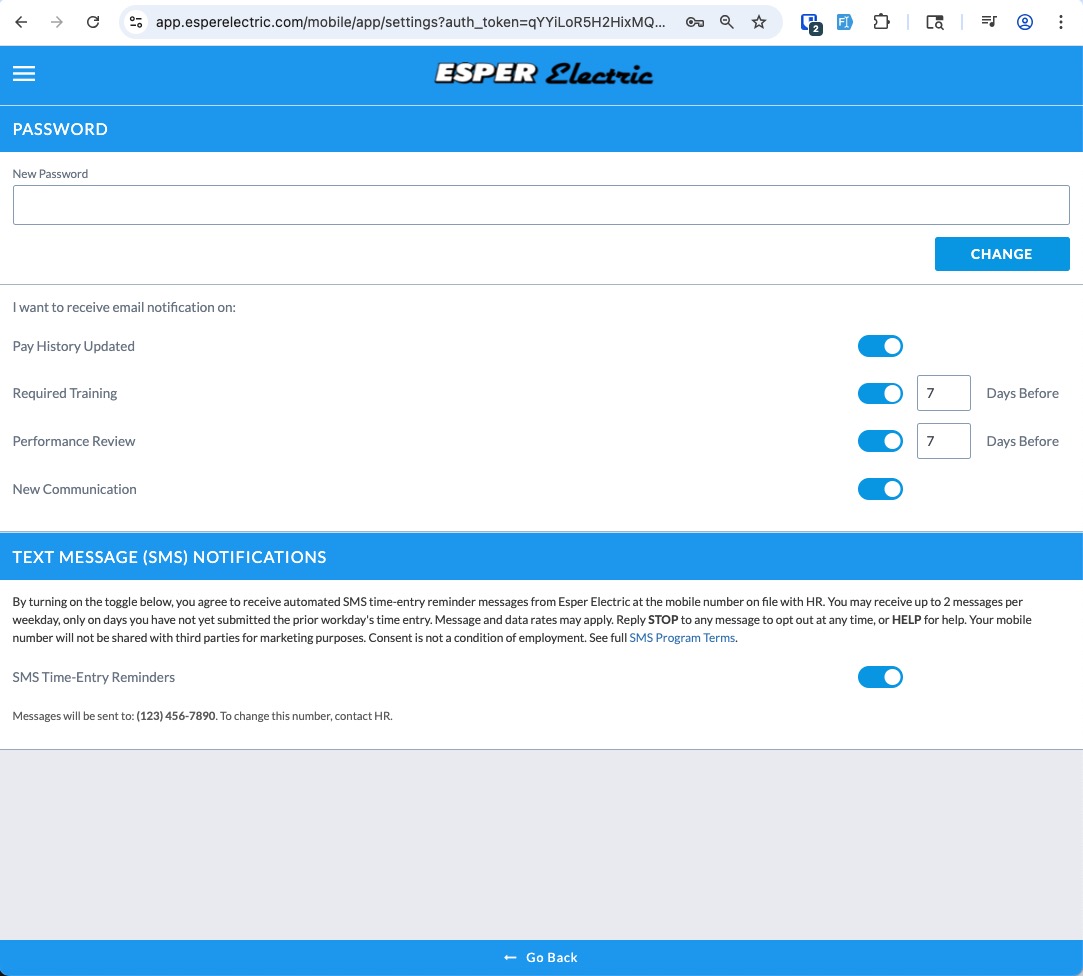
Every Esper Electric employee has an individual login to the Esper Electric mobile application. After signing in with their own credentials, the employee navigates to Settings → Text Message (SMS) Notifications. The screen displays an on-screen consent disclosure (program purpose, frequency, "message and data rates may apply," STOP and HELP behavior, the third-party-sharing restriction, and that consent is not a condition of employment), the mobile phone number on file with HR, and a single toggle labeled "SMS Time-Entry Reminders." Switching the toggle to ON is the affirmative consent action — it directly sets the notification_opt_in flag on the employee's record, which is the same flag the SMS sending job checks before each message. Switching it OFF immediately stops all future messages. The employee may toggle it as many times as they wish, and replying STOP to any received message has the same opt-out effect.
The disclosure paragraph shown on-screen at the moment the employee toggles consent reads:
The screenshot below shows the actual self-service screen as it appears to an employee inside the authenticated mobile application. The screen is behind a login because employee account data is private, but the consent disclosure and toggle shown here are the exact control the employee uses to opt in:
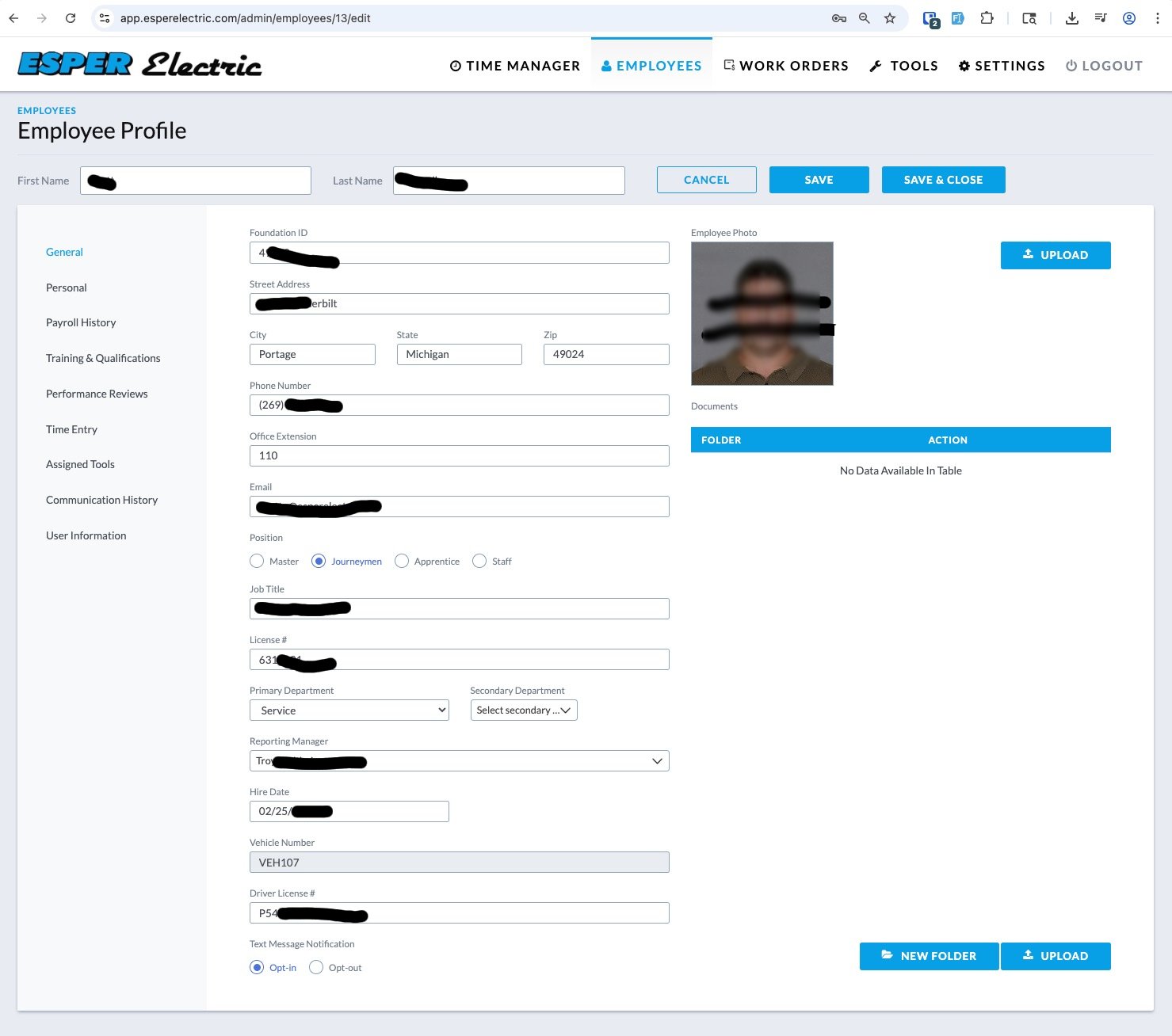
As a courtesy, Esper Electric HR may set the opt-in flag on behalf of an employee during onboarding when the employee has provided informed verbal or written consent to receive the SMS messages. In that case, HR explains the SMS program to the employee — program purpose, frequency, "message and data rates may apply," STOP and HELP behavior, that consent is not a condition of employment, and that mobile numbers will not be shared with third parties for marketing — and confirms the employee's consent before enabling the preference.
HR enables the preference on the "Edit Employee" screen of the internal employee management application at app.esperelectric.com (Admin → Employees → Edit Employee → Text Message Notification). The screen contains two radio buttons, "Opt-in" and "Opt-out," which write to the same notification_opt_in flag set by the self-service toggle in Path #1. This admin screen is restricted to authenticated Esper Electric staff because employee records are private personnel data.
Even after HR enables the preference, the employee can independently review or change their consent at any time using the self-service path described in #1, and replying STOP to any received message will opt them out immediately regardless of how the flag was originally set.
Mobile phone numbers and SMS opt-in / consent information are used solely to deliver the messages described above. Esper Electric will not sell, rent, share, or otherwise disclose mobile phone numbers or SMS opt-in / consent data to any third party or affiliate for marketing or promotional purposes. The only third party that processes these messages is our SMS delivery provider (Twilio), and only to the extent technically necessary to transmit the message to the recipient's carrier. Full details are published in our Privacy Policy.
Esper Electric, Ltd. · 7775 North 6th Street, Kalamazoo, MI 49009 · 269-342-6909 ·
info@esperelectric.com
SMS Program Terms: https://app.esperelectric.com/terms-and-conditions